



“In the event of an outage, you may not be able to retrieve Your Content or Data that you’ve stored.”
Microsoft Service Agreement (Sec.6b)
Despite the enormous popularity of instant messaging on platforms like Teams and Slack, email remains a cornerstone of business communication, making its protection vital for organisational continuity.
How often have you rifled through your “sent” folder to prove a point, find a contact or resolve an issue? We use email for things that are too important to get lost in the Teams feed abyss.
With the widespread adoption of cloud-based email services like Microsoft 365 and Google Workspace, there’s a prevailing misconception that these platforms inherently provide comprehensive data backup. This myth can lead to vulnerabilities in data protection strategies.
The Importance of Email Backup
Human error is a significant contributor to cybersecurity incidents, accounting for 95% of breaches, with 94% of malware being delivered via email.
From mistakenly opening malicious emails to accidental deletions or actions by disgruntled employees, the risk of losing critical email data is substantial. While ongoing security training to keep team knowledge up to date and the risks top of mind is important, implementing a robust email backup solution is essential to provide a reliable safety net and ensure business continuity.
The Cloud Email Backup Myth
A common assumption among end users is that using cloud services such as Microsoft 365 or Google Workspace eliminates the need for additional email backups. However, this overlooks the limitations inherent in these platforms’ native data protection features and it is our responsibility, as IT service providers, to ensure our clients have a decent data protection strategy.
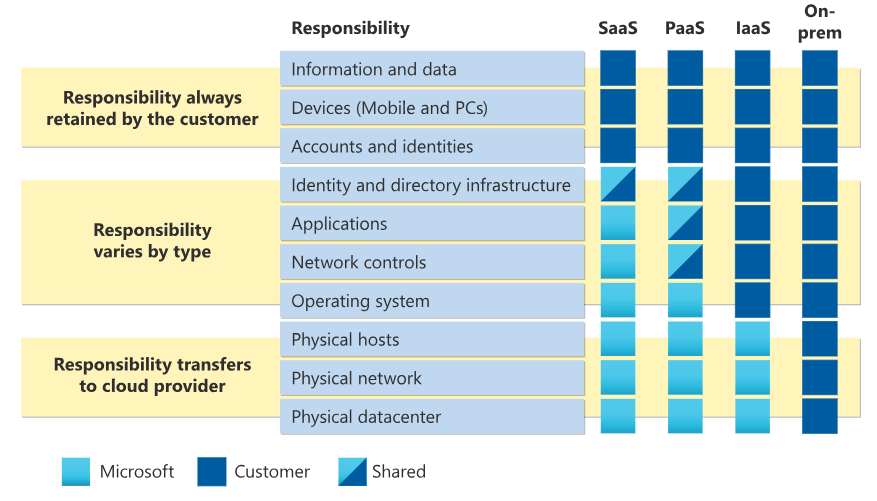
Both Microsoft and Google acknowledge the necessity for users to manage their own data backups. As noted above, the Microsoft Service Agreement advises users to regularly back up their content and data stored on their services or through third-party apps and their Shared Responsibility Model, states that with Microsoft 365, it’s your data and it is your responsibility to protect it.
Google’s data retention policies include automatic deletion of items in the Trash folder after 30 days, and administrators have a limited window of 25 days to restore items deleted from a user’s trash.
Limitations of Native Backup Solutions
Relying solely on the built-in backup features of cloud email providers presents several challenges for both clients and MSPs:
- Retention Policy Gaps: Native retention policies can be complex and may not align with an organisation’s data retention requirements, leading to potential data loss after the retention period expires.
- Single Point of Failure: Storing backups within the same cloud infrastructure creates a single point of failure, increasing vulnerability in the event of a service outage or cyberattack.
- Limited Recovery Options: Native tools often lack automated recovery options, requiring manual processes that can be time-consuming and prone to errors, especially when dealing with large datasets or complex directory structures.
The Smart Approach
To address these limitations, integrating third-party backup solutions is crucial.
Third-party solutions provide independent backups, ensuring data remains secure and accessible even if the primary service experiences failures. These solutions often offer faster recovery times compared to native tools, minimising downtime and supporting business continuity – and making IT professionals’ lives easier. The better options like Dropsuite also back up Microsoft 365 components including Teams, SharePoint and OneDrive as well as Calendars Contacts and Tasks.
“Using a third-party tool enables MSPs to implement the 3-2-1 backup strategy: maintaining three copies of data, stored on two different media formats, with one copy stored offsite.”
Dropsuite
Third-party backups can also scale with a business, offering flexible options to meet evolving data protection needs.
Don’t forget Entra ID
Microsoft Entra ID (formerly Azure AD) is essential for managing identity and access across your client’s organisations, enabling secure authentication, access control, and identity risk management.
Entra ID is at risk from attackers, and Microsoft only saves the data for 30 days. Entra ID also lacks a “recycle bin” or undo functionality for identity configurations. This makes the recovery process slow and difficult, especially when trying to restore specific user settings. To ensure business continuity, choose a third party solution like Dropsuite Entra Backup that protects clients’ critical data and configurations that control access to internal and external resources.
The misconception that cloud-based email services provide adequate data backup can leave organisations vulnerable to data loss and MSPs are the ones who have to clean up the mess. Understanding the limitations of native backup features in platforms like Microsoft 365 and Google Workspace is essential. Implementing third-party backup solutions like Dropsuite is a proactive approach to safeguard critical email data, ensuring robust protection against data loss and supporting seamless business continuity.