

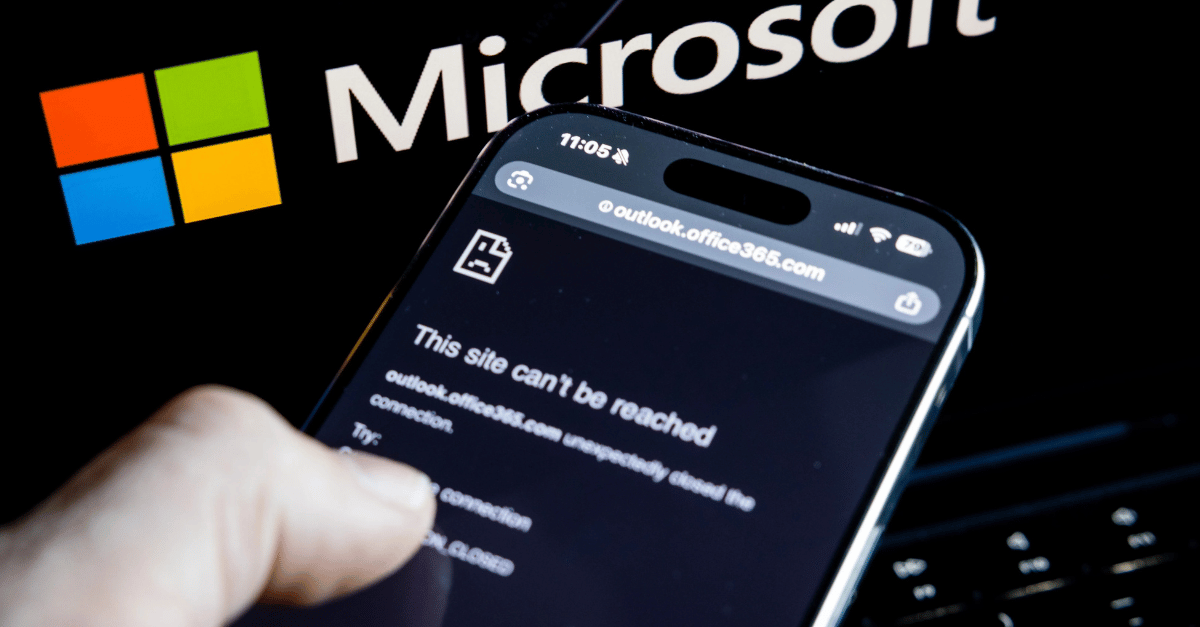
You already know the story. A Microsoft 365 outage that started in Exchange Online cut users off from their mailboxes for the whole Australian business day, and the knock-on effects reached Teams calendars, Copilot, Purview and Defender.
Microsoft tracked it as two incidents:
- EX1550543 (Exchange Online): users couldn’t connect to their mailboxes through Outlook desktop, Outlook on the web, mobile or other connection methods, and mail delivery was delayed.
- MO1550821 (Microsoft 365): the dependent services that rely on Exchange Online.
In Australian time the outage ran from about 3:20am Friday to 3:10am Saturday (AEDT): all of Friday’s working day. Some tenants were still clearing mail backlogs into the weekend.
An outage that long falls well outside Microsoft’s 99.9% uptime commitment, so affected organisations can request an SLA service credit.
What you can expect
Microsoft’s Online Services SLA commits to 99.9% monthly uptime for Exchange Online.
When a service falls short, the customer can request a credit against that service’s monthly fee.
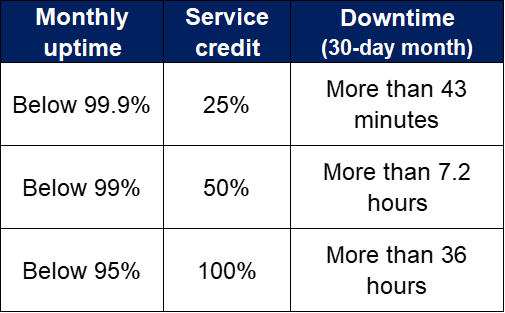
How uptime is measured. Uptime is worked out per tenant, per calendar month, in user minutes. Each user has 43,200 minutes in November. The downtime that counts is the length of the outage multiplied by the number of users who were affected.
What that means for this outage. A user who was locked out for the full 1,430 minutes lost about 3.3% of the month, which puts uptime at roughly 96.7%. That’s in the 50% tier. But it depends on how many users were affected and for how long. If the average user’s downtime across the tenant was under about 7.2 hours, uptime stays above 99% and the claim drops to the 25% tier.
How the credits work
This is where customer expectations need managing IN ADVANCE:
- Only the affected service. If Exchange Online was the affected service, the credit is calculated on the Exchange Online part of the fee, not the whole subscription. For bundles such as Microsoft 365 Business Standard or Business Premium, that’s only the portion of the licence attributed to Exchange.
- It’s a credit, not a refund. It comes off a future invoice; there’s no cash payment.
- Microsoft decides. Every claim is assessed individually and incomplete claims can be rejected.
For example. Say a 20-user office was locked out for the whole outage, and the Exchange part of each licence is worth $8 a month (an illustrative figure, not a price list). At the 50% tier the credit would be 20 × $8 × 50% = $80 for the month. For most small businesses, the number will be in that range: real, but modest compared with the cost of a day without email.
Before lodging anything, check the final Post Incident Review in the Microsoft 365 admin centre under Service Health. It confirms the official times and status, which Microsoft uses to assess claims.
How to claim
If your clients buy Microsoft 365 through the CSP program, they can’t lodge an SLA claim with Microsoft themselves. The claim goes up the chain: client to you, you to Manage Protect, and us to Microsoft. More info in the Partner Center.
The deadline. Claims must reach Microsoft within one month of the end of the billing month in which the incident happened. For this outage, that’s 31 December 2026. We will need time to process claims before then, so we are asking for customer emails by 11 December.

Steps to claim your Microsoft SLA credit
1. Confirm the incident. Check the client’s Service Health for EX1550543 and/or MO1550821.
2. Get the client’s request. An email asking for the credit, sent from their own company domain (not a personal address or yours), stating how many users were affected and where.
3. Add the details. Tenant ID (GUID), incident ID(s), outage start and end times, and a line on troubleshooting, e.g. “Confirmed the incident in Service Health; Outlook and Outlook on the web both failed; monitored until Microsoft restored service.”
4. Send it to your Microsoft distributor: one claim per tenant, before their cut-off.
5. Pass on any credit. If Microsoft approves the claim, we will issue a credit note to you. Apply it to the client’s next invoice.
It’s a good idea to keep a log of which clients claimed, when you lodged each claim and the outcome, so you can match it up when it arrives, which may not be until the new year when we have all forgotten this ever happened.
Is it worth it?
Let’s be honest: for an MSP, there’s nothing in this.
Any approved credit belongs to the client and should go back to them in full, while the claim takes your time to prepare and reconcile.
BUT this outage made mainstream news and your clients will hear about credits sooner or later. If they hear it from someone else, they will wonder why you didn’t tell them and that’s not worth a dent in the relationship.
So inform every impacted client, be straight that the credit is modest and not guaranteed, and let them decide. For those who say yes, pre-fill everything you can and pass the full credit on when it arrives.
The credit is small. The trust you build by handling it well is worth a lot more.